


Shopify Speed Optimization 2026: Achieving a 90+ Score on Mobile Target
Every Shopify merchant now wants a faster store, but what they don’t know is that, in 2026, speed is not only a technical upgrade. It’s your bread-and-butter traffic driver.
Speed directly affects everything that matters in SEO visibility, paid ad efficiency, conversion rates, and customer retention. When your store loads faster, Google rewards you, ads perform better, and visitors become customers. And when it doesn’t, you pay for getting traffic, but convert less of it.
Here’s the harsh truth: most merchants don’t realize:
Most Shopify stores are bloated with old app code.
Apps that were removed and deleted months or years ago leave their scripts behind. This slows down your store, affects core web vitals, and silently drags your mobile pagespeed down.
But here is the good news:
You don’t have to rebuild the new store or sacrifice features to fix it.
In this blog, we’ll show you how to clean hidden app bloat, optimize what actually matters in 2026, and consistently hit a 90+ PageSpeed Insights score on mobile. And you can do all this without breaking functionality and interrupting your store’s performance.
Core Web Vitals 2026: What Has Changed in Google’s Ranking Factors
In 2026, core web vitals are not just technical benchmarks; they are direct indicators of how usable your Shopify store feels on mobile. The core metrics remain familiar, and how Google evaluates them has changed. Let’s find out what has actually changed and how it affects Shopify speed optimization in 2026.
Google Now Prioritizes Real User Experience Over Lab Scores
One of the biggest changes in 2026 is how Google evaluates performance. PageSpeed Insights and Lighthouse are still useful, but they are no longer the primary source of ranking. Google now relies on:
- Chrome User Experience Report (CrUX)
- Field data from real mobile users
- Long-term performance consistency
- Device and network diversity (not just fast connections)
This means you can’t play games to increase performance by optimizing lab tests only. If your Shopify store becomes slow, unstable, or lags, Google will see it and rank your website accordingly.
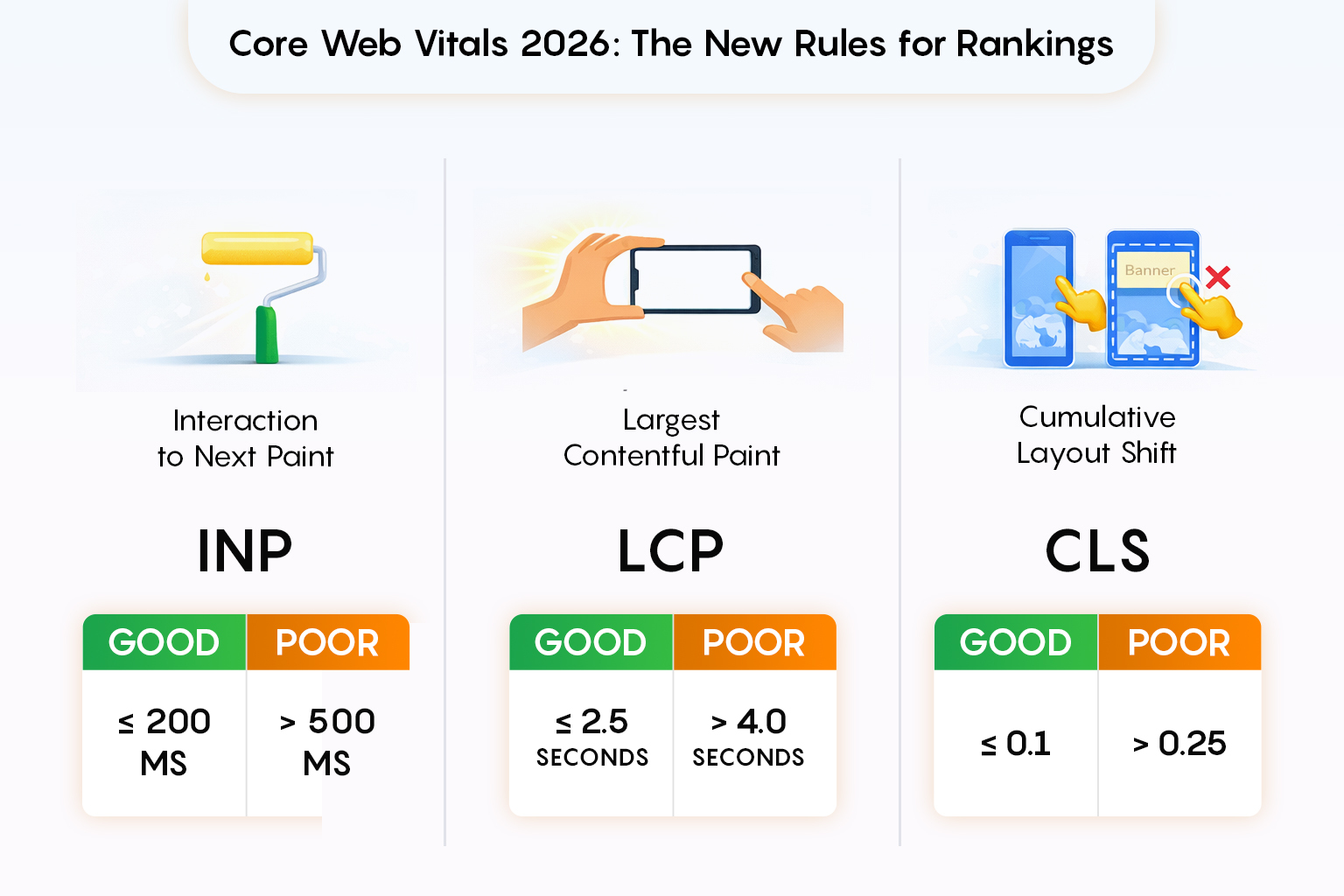
Interaction to Next Paint (INP) Has Replaced FID
First Input Delay (FID) is now officially gone. Interaction to Next Paint (INP) has become the primary performance signal. INP measures how quickly your store responds after a user interacts. It does not do it with just a few clicks, but with every user interaction during their visit.
For a Shopify store, this is a major shift. Heavy themes and programs that load JavaScript across the site can significantly boost INP, even if page load times appear to be adequate.
Target in 2026: INP under 200ms on mobile.
Largest Contentful Paint (LCP) Is Still Critical
Largest Contentful Paint still measures how fast your main content loads, but Google now evaluates it with more precision. For most Shopify stores, the LCP element is the hero image or the product featured image. If that asset is:
- Too large
- Poorly compressed
- Not served in modern formats like AVIF
- Delayed by JavaScript execution
Your LCP score will suffer.
Target in 2026: Consistent LCP under 2.5 seconds on mobile devices.
Cumulative Layout Shift (CLS) Is Measured Over the Entire Session
CLS is no longer about the initial page load. Google now tracks layout changes that occur during a user’s session. Shopify’s common CLS difficulties arise from:
- Late-loading app widgets.
- Dynamic banners or pop-ups
- Review apps that inject material.
- Cart drawers and adhesive elements without a designated space
Even minor layout changes can add enough to push your store beyond the “good” threshold.
Target in 2026: CLS below 0.1 across the full session.
The Real Shopify Speed Killer: App Bloat and “Ghost Code”
Here is the uncomfortable but realistic truth: Deleting an app from Shopify does not mean its code is gone.
Most apps inject scripts into:
- theme.liquid
- content_for_header
- Snippets
- Sections
- Assets
- Webhooks and metafields
When merchants uninstall apps, the code stays behind. These leftovers are called app ghosts, and they silently destroy performance.
Signs Your Store Has App Ghosts
- PageSpeed score stuck below 70
- INP warnings even on simple pages
- Long JavaScript execution time
- Multiple unused scripts that are loading site-wide
- Third-party requests you don’t recognize
This is why you should hire professional Shopify speed optimization services. They start with an audit, not only images of themes.
App Auditing: Step-by-Step Guide to Finding Ghost Code

App bloat is the first reason Shopify stores fail to achieve strong web core vitals in 2026. Even stores with the best themes and optimized images suffer from ghost code: leftover scripts and files from apps removed long ago. Deleting an app from the Shopify admin does not automatically remove all of its code.
Here is how to do an audit of your store properly and identify what is slowing it down:
Step 1: Create a Full App History
Start by listing:
- Apps currently installed
- Apps previously installed and removed
- Trial apps used for testing or campaigns
Even short-term apps can leave permanent scripts behind. Check your Shopify billing history and logs of installed apps to find everything that may have affected your theme.
Step 2: Inspect theme.liquid for Injected Scripts
Open your theme’s main layout file and check:
- Script tags loading third-party domains
- Inline JavaScript blocks tied to apps
- Overloaded content_for_header output
This is where monitoring, review, and upsell apps inject global scripts that appear on every page, even when the app is not active.
Step 3: Review Snippets, Sections, and Assets
Navigate through:
- Snippets (snippets/)
- Sections (sections/)
- Assets (assets/)
Check for files named after apps or vendors. Old review widgets, pop-up logic, analytics scripts, and abandoned upsell components are some common examples. If the app is deleted but the file remains, it is likely to be dead code.
Step 4: Use Browser DevTools to Spot Hidden Requests
Open Chrome DevTools → Network tab → Reload the page. After opening that, check if:
- JavaScript files are loading on every page
- Requests to domains you don’t recognize
- Scripts that load but don’t trigger visible functionality
These hidden network requests find ghost apps that are still working behind the scenes.
Step 5: Identify Which Code Can Be Safely Removed
This is the most important phase. Do not delete all app code blindly. Some might still support:
- Checkout tracking
- Analytics Integrations
- Theme functionality
Take a safe approach and:
- Comment out suspected code first
- Test performance and functionality
- Remove permanently only after verification
This is the reason many Shopify merchants hire Shopify speed optimization services, because safe cleanup requires Shopify-specific expertise.
Step 6: Re-Test Core Web Vitals After Cleanup
Once the ghost code is removed:
- Re-run PageSpeed Insights
- Monitor INP and JavaScript execution time
- Check real user performance over several days
In many cases, app auditing can improve mobile PageSpeed scores by 20–30 points, without affecting images or design.
When DIY App Auditing Becomes a Bottleneck?
By this, you might have understood that you can do app auditing, but it’s not as simple as it looks. Many merchants start with the intention of doing it till the end, but some leave doing it halfway, some don’t know what to do after a few steps, and some realize that it’s not a one-time task.
It’s an ongoing process that requires technical and platform-specific knowledge and a clear understanding of how performance changes affect revenue. Common challenges are:
- Uncertainty about which scripts are safe to remove
- Fear of breaking checkout, analytics, or conversion tracking
- Difficult tracking performance issues back to specific apps
- Limited time to test changes across devices and templates
This is a risk for growing brands. Every change made to improve speed can affect user experience or sales, especially on mobile.
This is why growing brands work with Shopify speed optimization agencies like Mandasa Technologies. They identify and remove ghost code without sacrificing functionality. Many brands and companies find it difficult because they don’t have platform-specific experience.
The goal isn’t just a higher PageSpeed score. Its performance improvements don’t compromise growth, tracking, or customer experience.
Image & Video Optimization in 2026: AVIF or Die
Images and videos are the biggest assets of Shopify stores, but now optimization standards have changed.
AVIF Is the New Standard
In 2026, AVIF became the best-performing format. It wins because:
- Up to 50% smaller than WebP
- Higher quality at lower file sizes
- Supported by all modern browsers
- Faster LCP scores on mobile
Every Shopify store that wants to achieve 90+ Pagespeed should:
- Convert hero images to AVIF
- Use responsive srcset
- Avoid oversized images on mobile
CSS-Only Lazy Loading (When Possible)
Javascript based on lazy loading increases execution time, which affects INP. Use native loading=\”lazy\”, CSS background images for non-critical visuals, and avoid third-party lazy loaders unless necessary.
Video Optimization Rules for Shopify
Although videos are strong, they can have an impact on speed. Below are some best practices:
- Never use autoplay on mobile.
- Load videos after user interaction.
- Use poster images (AVIF).
- External hosting (YouTube, Vimeo) with deferred loading.
- Avoid embedding videos above the fold.
JavaScript: The Silent Performance Killer
In 2026, JavaScript execution time has become one of the most common reasons Shopify merchants fail core web vitals. Here are some common JavaScript errors:
- Loading scripts site-wide instead of page-specific
- Blocking scripts in the head
- Multiple tracking tools are doing the same job
- Apps are injecting redundant event listeners
This is where you should hire shopify speed optimization agency to outperform DIY. Here is how they help high-performing Shopify stores:
- Remove non-critical scripts
- Load apps conditionally (product page only, cart only, etc.)
- Remove duplicate analytics
- Replace heavy apps with lightweight custom code
The Liquid vs. Hydrogen Debate: When They are Worth It?
Shopify merchants think speed optimization starts and ends with better themes, clean code, and smart app usage. But in 2026, the biggest question is:
Is Liquid enough, because if not, it’s time to go headless with Hydrogen
The answer depends on scale, complexity, and performance goals.
When It Makes SenseSpeed issues are app-related and fixableLiquid optimization has reached its limit
| Factor | Liquid (Traditional Shopify) | Hydrogen (Headless Shopify) |
| Frontend Architecture | Theme-based rendering using Shopify Liquid | Custom React-based frontend with full control |
| Performance Ceiling | High, but limited by theme and app architecture | Higher ceiling with fewer frontend constraints |
| INP (Interaction Speed) | Can degrade with multiple apps and scripts | Typically stronger due to controlled JS execution |
| JavaScript Load | App-driven, often global | Modular, page-specific, and intentional |
| Core Web Vitals Control | Partial control within Shopify’s framework | Built-in controls |
| App Dependency | Relies heavily on apps for features | Many features can be built natively |
| Development Complexity | Low to moderate | High (requires experienced developers) |
| Maintenance Effort | Minimal ongoing maintenance | Requires ongoing technical oversight |
| Best For | Standard ecommerce stores | High-traffic, performance-sensitive brands |
| Cost Consideration | Lower upfront and ongoing cost | Higher initial investment, more flexibility |
When Liquid Is the Right Choice?
Liquid is still chosen by the majority of Shopify stores because it can help achieve:
- 90+ PageSpeed Insights scores on mobile
- Strong Core Web Vitals
- Excellent SEO performance
- Full compatibility with Shopify apps
It works best if:
- You run a standard store
- Your catalog and logic are relatively simple
- You rely on Shopify apps for functionality
- You want lower development and maintenance costs
- Speed issues are mostly caused by app bloat, not architecture
But it has its limits, and you may face challenges if:
- Your store has heavy JavaScript requirements
- You rely on complex animations or interactions
- You run content-heavy or experience-driven pages
- Multiple apps are required just to achieve basic UX
- INP remains poor even after aggressive optimization
When Hydrogen (Headless) Becomes Worth It?
Hydrogen is Shopify’s headless framework and gives developers complete control of the frontend while using Shopify as a backend. Hydrogen makes sense when:
- You need ultra-fast, app-like performance
- You want near-instant interactions
- You’re hitting a ceiling with Liquid optimization
- You can replace multiple apps with custom logic
- Performance is directly tied to brand differentiation
Headless setups increase
- Interaction responsiveness (INP).
- JavaScript Efficiency
- Page transitions.
- Overall perceived speed.
Many merchants wonder about the Shopify speed optimization cost. It involves:
- Higher upfront development costs
- Ongoing maintenance
- Reduced access to plug-and-play apps
- More technical oversight
Hiring a Shopify speed optimization agency will help you exhaust liquid-based optimization before moving to hydrogen.
Shopify Speed Optimization Cost: What Should You Expect?
Shopify speed optimization costs vary according to light cleanup and big structural changes. The key is to understand that speed optimization isn’t a fixed package. There are various factor that influences cost:
- Number of installed and previously removed apps
- Amount of leftover or undocumented app code
- Theme complexity and customization level
- JavaScript execution time and INP issues
- Whether problems are mobile-only or site-wide
Why Speed Optimization Is Rarely “One-Size-Fits-All”?
Quick fixes and generic plugins rarely deliver results. Speed improvements come from understanding how your store works, what scripts are important, and what can be safely removed.
This is where experienced teams approach speed differently. Rather than chasing scores, they want to protect functionality, track accuracy, and revenue flows, while improving performance. What’s overlooked is the opportunity cost of leaving performance issues unresolved. Slow mobile speeds increase ad costs, reduce conversions, and SEO growth over time. Approaching speed optimization as a measured, strategic improvement, instead of a rushed fix. This allows brands to move faster without risking stability.
Why DIY Speed Fixes Usually Fail?
Many Shopify merchants try to fix speed issues themselves, and that makes sense. You get full tutorials and checklists that say you will gain 90+ pagespeed scores.
But,
DIY speed fixes don’t work in 2026. Not because they are not capable, but because performance issues are not as simple as you think.
Speed Problems Are Structural
Most DIY fixes focus on surface-level improvement, like:
- Compressing images
- Installing a “speed booster” app
- Turning on lazy loading
- Minifying files
They help, but not much, and also don’t address real challenges, like app architecture, JavaScript execution, and leftover code.
PageSpeed Scores ≠ Real Performance
DIY guides do not optimize real users. Google now prioritizes:
- Real mobile user data
- Response to interactions across the session
- Consistent performance for a long time
A temporary improvement won’t help if shoppers experience lags or delays.
Performance Requires Ongoing Maintenance
Shopify stores evolve constantly with:
- New apps
- New features
- Seasonal campaigns
- Theme updates
DIY fixes are one-time actions. Without continuous monitoring, performance will degrade and eventually become worse.
The Real Reason DIY Fails
DIY fixes fail because they treat performance as a checklist. Shopify speed optimization requires:
- App-level auditing
- JavaScript management
- Core Web Vitals expertise
- Continuous testing with real user data
That’s why merchants now work with a Shopify speed optimization agency instead of DIY, not because DIY is impossible, but because speed is important to them.
Final Thoughts
Traffic is expensive.
Ads are competitive.
SEO takes time.
Speed is the only factor that improves everything at once. If your Shopify store isn’t hitting 90+ on mobile in 2026, it’s not because Shopify is slow; it’s because your store is slow.
The good news?
It can be fixed.
Want to know what is slowing down your store?
Get an audit from our Shopify developers. We’ll identify ghost apps, Core Web Vitals issues, and real opportunities to increase your Shopify store speed in 2026, without affecting anything on your store.
