


High-Ticket Checkout Optimization with Shopify Functions
The checkout is no longer a closed box. Shopify Functions make high-ticket upsells possible without performance trade-offs.
For years, checkout optimization on Shopify felt like working in a locked room. You could tweak the product pages, landing pages, and cart drawers, but once the customer reached checkout, control disappeared. That limitation capped Average Order Value(AOV), especially for high-ticket and complex purchases.
With Shopify Checkout Extensibility, product teams can now use high-impact checkout logic without hacks, scripts that slow the site, or fragile workarounds.
This blog explores how to optimize high-ticket Shopify checkouts using Shopify Functions, and Checkout Extensibility. It explains how to apply checkout rules for payments, shipping, and incentives without slowing performance.
Why High-Ticket Checkout Optimization Is Different?
Optimizing checkout for a $20 t-shirt and a $1500 product are different problems.
High-ticket buyers:
- Check the payment options carefully
- Expect a clear, simple checkout
- Look for trust, reassurance, and professionalism
- Will abandon the purchase if checkout feels off.
For product managers, checkout optimization is not about UI; it’s about logic, sequencing, and control. That’s exactly what Shopify’s new checkout architecture enables.
The Tech Shift: checkout.liquid Is Dead
Let’s address the elephant in the room.
checkout.liquid Is Officially Deprecated
Before, advanced checkout customization relied on:
- Checkout.liquid
- Inline JavaScript
- Shopify Scripts
- Theme-level hacks
This approach worked well, but now it is:
- Fragile
- Hard to test
- Performance-heavy
- Security risks
Shopify made a decisive shift.
Enter Shopify Checkout Extensibility
Shopify checkout extensibility replaces checkout.liquid with a modular, API-based system built on:
- Shopify checkout extensions (UI extensions)
- Shopify Functions (backend logic)
- Secure, sandboxed execution
- Guaranteed performance budgets
This means:
- Checkout logic becomes a scalable system, rather than a one-time change.
- Teams can deploy changes quickly without compromising stability.
- Experimentation remains completely regulated and planned.
Functions in High-Ticket Checkout Optimization
| Aspect | Shopify Scripts | Shopify Functions |
| Execution | Checkout runtime (legacy) | Server-side, native |
| Performance | Can slow checkout | Predictable performance |
| Scalability | Hard to manage at scale | Predictable and extensible |
| Compatibility | Limited with Shop Pay | Fully compatible |
| Use cases | Basic rules and adjustments | Payments, shipping, incentives |
| Risk control | Fragile, harder to test | Secure and sandboxed |
| Future support | Legacy, phased out | Shopify’s standard |
High-ticket checkout optimization on Shopify has evolved through two related mechanisms: Shopify Scripts and Shopify Functions. Understanding how each fits into the modern checkout stack enables product managers to make smarter decisions around performance, risk, and scalability.
Shopify Scripts, which stopped working on June 30, 2026, were the earlier approach to checkout logic. Shopify Functions is the replacement. They enabled conditional pricing, shipping rules, and payment adjustments directly within the checkout flow. For many high-ticket stores, scripts enabled basic personalization and protections without changing the frontend experience.
Shopify Functions extends that same idea, but within Shopify’s new Checkout Extension architecture. Rather than being tied to legacy checkout infrastructure, Functions run server-side in a controlled environment and are designed to work alongside checkout extensions.
In practice, both mechanisms focus on the same goal:
- Enforcing business rules at checkout
- Adjusting payments, shipping, or incentives dynamically
- Protecting margin and reducing risk on high-value orders
The key shift is architectural. Functions enable checkout logic to be
- More predictable at scale.
- Easy to test and reason about.
- Compatible with the expedited checkout experiences.
- Separated neatly from UI messaging.
Scripts introduced the idea of checkout logic. Functions make it a reliable, expandable system that can handle high-volume use cases without sacrificing performance.
Why Product Managers Should Care About Checkout Logic?
Checkout is about more than just payments. Where is it?
- Upsells: success or failure?
- Risks are analyzed.
- Loyalty is rewarded
- Margin is safeguarded.
With the Shopify checkout extensions and functionality, checkout becomes:
- A rule engine
- A personalized surface.
- A revenue lever
Use Case #1: Hiding Payment Methods for High-Risk Orders
Let’s start with a high-impact, low-visibility optimization.
The Problem
High-ticket orders come with:
- Fraud risk
- Chargebacks
- Payment method abuse
Showing every payment option to every customer adds unnecessary risk.
The Solution: Shopify Functions for Payment Customization
Using Shopify functions, you can hide specific payment methods:
- Based on cart value
- Based on product type
- Based on customer behavior signals
Example
- Hide Cash on Delivery for orders over $1,000 to prevent customers from choosing cash for very expensive orders.
- Turn off Buy-Now-Pay-Later for expensive or risky products to stop high-value or easily resold items from being purchased on deferred payment.
- Remove payment methods that don’t work for international orders to ensure customers only see valid payment options in their country.
This protects revenue, reduces fraud, and improves checkout clarity. And because it runs on the server-side, it’s fast and secure.
Use Case #2: Auto-Adding Free Gifts at Specific Cart Values
Few AOV tactics are as effective as the free gift threshold when implemented correctly.
The Old Way (And Why It Failed)
Before, free gifts were added with the help of:
- Frontend scripts
- Cart page hacks
- Third-party apps that reloaded checkout
This created so many problems, like:
- Race conditions
- Checkout mismatches
- Performance issues
- Broken Shop Pay flows
The New Way: Shopify Checkout Extensibility + Functions
With Shopify Checkout Extensibility, you can
- Check cart value at checkout
- Automatically add a free gift
- Ensure it persists through payment
- Remove it if conditions change
Shopify Checkout Extension Example
UI extension shows: You’ve unlocked a free gift. Shopify’s function ensures that:
- Gift is added server-side
- Gift has zero price
- Gift can’t be removed manually
This feels magical to the customer, invisible technically.
Use Case #3: Reordering Shipping Options Based on Loyalty Tier
Shipping choice is a subtle but powerful conversion layer.
The Problem
Most checkouts show shipping methods in a fixed order:
- Cheapest first
- Or Shopify’s default ranking
This misses the customer’s context.
The Opportunity
With Shopify Functions examples, you can reorder shipping options based on:
- Loyalty tier
- Past purchase behavior
- Subscription status
- Order value
For Example:
- VIP customers see express prioritized shipping and get an automatically discounted checkout.
- First-time buyers are guided towards standard shipping to simplify their decision-making process.
- High-ticket orders surface insured shipping as the preferred option to improve trust and security.
This increases perceived value and nudges customers toward high-margin shipping options, all without adding UI clutter.
Where Shopify Checkout Extensions Fit In?
So far, we’ve mostly talked about backend logic. But Shopify Checkout extensions handle the experience layer.
What Checkout Extensions Do Well:
- Display messages relevant to the customer’s context
- Reinforce upsell opportunities
- Show trust-building signals
- Clarify incentives like free gifts, thresholds, or loyalty perks
What They Should Not Do?
- Heavy logic
- Price calculations
- Cart manipulation without Functions
This winning architecture is Extensions for UI and Functions for logic. This separation is what makes it fast and safe.
Performance: Performance: Why Functions Beat Old Checkout Hacks Every Time
Product managers are skeptical of anything that touches checkout. Here is the performance reality:
Old checkout.liquid and Theme-Level Customization
- Added JavaScript to checkout
- Increased Time to Interactive
- Blocked rendering
- Created race conditions with Shop Pay
Shopify Functions & Checkout Extensibility
- Server-side execution
- Strict performance budgets
- No layout shifts
- No blocking scripts
- Fully compatible with Shop Pay and accelerated checkouts
In short, you can have more control with less risk. This is why Shopify is pushing teams away from the legacy of Shopify script and towards functions.
Standardizing Checkout Logic with Pre-Built Extensions
As checkout optimization becomes a core product lever, many teams are moving away from one-off implementations and going towards standardized checkout behaviors that can be reused, configured, and safely iterated.
Instead of rebuilding logic for every promotion or experiment, product managers rely on pre-built extensions that match with Shopify checkout extensibility. These extensions bundle high-impact patterns, such as incentives, messaging, and conditional checkout logic, into controlled, production-ready components.
Checkout extensions pro fits this model by working in Shopify’s supported checkout framework. It uses:
- Shopify checkout extensions for UI placement
- Shopify Functions for backend logic
- Enforced performance and security by Shopify
Checkout behavior feels natural, runs quickly, and can be customized without the use of scripts or bespoke deployments. This method makes it easy to control risk, maintain consistency, and focus on increasing AOV.
Build vs Buy: Do You Need a Shopify Checkout App?
Many teams ask if they should:
- Build custom logic in-house
- Or install a Shopify checkout app.
| Decision Area | Build In-House | Use a Shopify Checkout App |
| Time to launch | Slow | Fast |
| Maintenance | Ongoing engineering effort | Managed by vendor |
| Performance risk | Depends on implementation | Shopify-compliant by default |
| Flexibility | Fully custom | Configurable patterns |
| Testing & rollbacks | Manual | Built-in controls |
| Common use cases | Bespoke logic | Payments, incentives, shipping |
| Best for | Complex internal needs | Proven checkout optimizations |
When a Checkout App Makes Sense?
- You want faster time-to-value
- You need common use cases (free gifts, payment rules)
- You don’t want to maintain Rust/WASM code
- You want analytics and A/B testing baked in
When to Build Custom?
- Highly bespoke logic
- Deep internal systems integration
- Unique loyalty or pricing models
Modern checkout apps are built on top of Shopify Checkout Extensibility, not on the hacks around it. That’s the difference.
Common Mistakes Product Teams Still Make
Even with current checkout technologies, teams can jeopardize high-ticket conversions by overcorrecting or misusing extensibility.
Mistake #1: Treating Checkout Like a Marketing Page
Checkout is a decision environment, not a persuasion funnel. Adding long copy, promotional banners, or multiple CTAs increases cognitive load at the moment customers need clarity. High-ticket buyers do not need more selling; they need reassurance that they are making the right choice.
Mistake #2: Doing Everything in Extensions
Checkout UI extensions are powerful, but they’re not for business logic. When teams push all behavior into extensions, it results in:
- Heavy layouts
- Inconsistent behavior across payment paths
- Confusing or duplicated messaging
There’s a simple way to approach this:
Functions enforce the rules. Extensions communicate the result to the customer. Keeping these separate helps checkout stay fast and easy to maintain.
Mistake #3: Ignoring Performance Budgets
Shopify enforces rigorous checkout performance restrictions since even minor delays can have a negative impact on conversions. Ignoring them can lead to:
- Deployment blockages
- Unpredictable checkout behavior.
- Lost faith in expedited checkouts.
At checkout, performance is a conversion necessity. Adhering to these principles leads to better product selection and more disciplined execution.
A Simple High-Ticket Checkout Optimization Framework
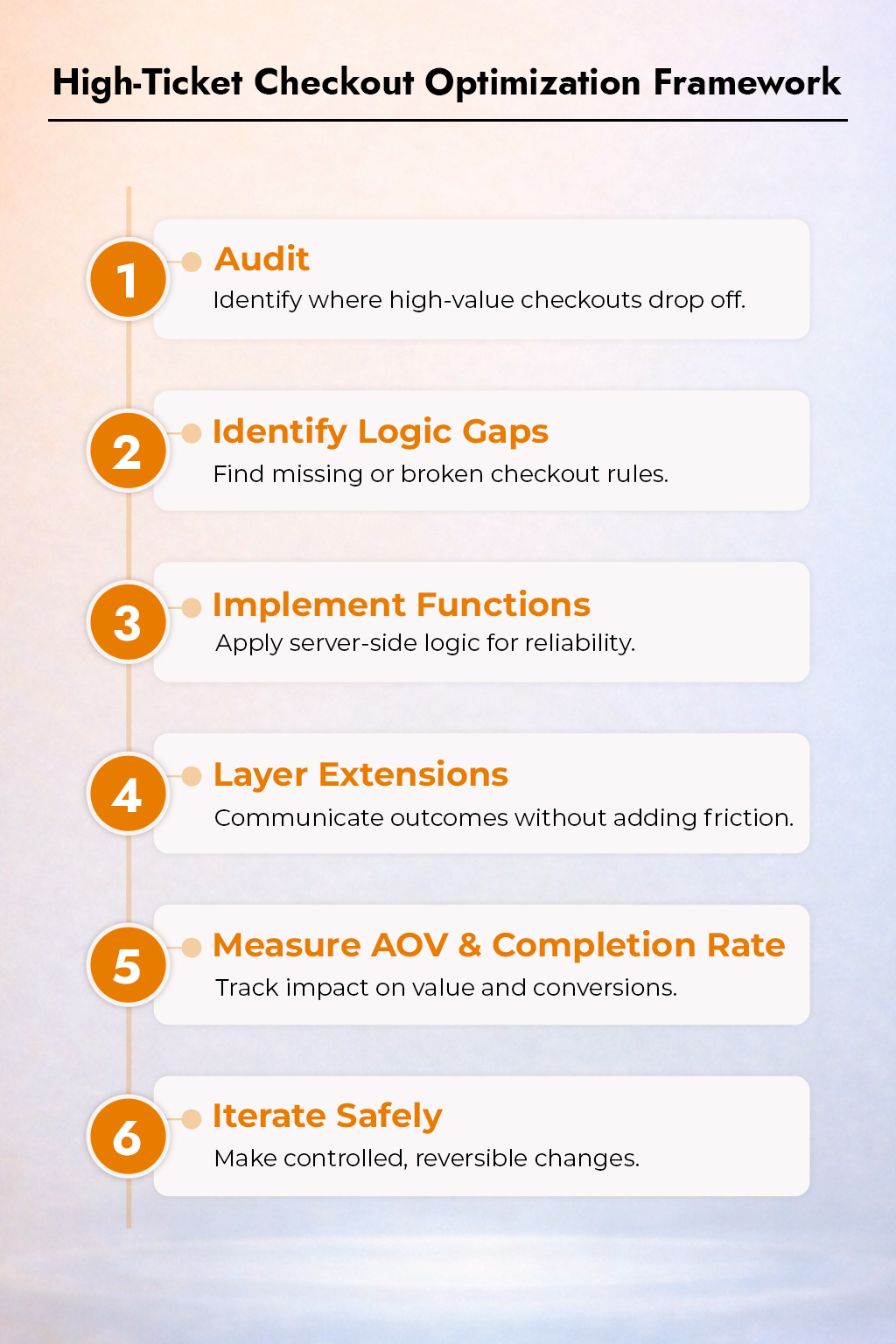
Checkout optimization should feel like a controlled product iteration, not a risky experiment. This framework keeps changes focused, measurable, and safe.
1. Audit
Where do high-value orders drop off?
Instead of making assumptions, start with data. Examine checkout performance by order value to identify friction areas that affect high-ticket carts. You ought to focus on:
- Drop-off rate following payment option.
- Payment method-based abandonment
- Cart completion rate above your AOV median
High-ticket failures arise late in the checkout process, when confusion or poor defaults cause hesitancy.
2. Identify Logic Gaps
Once you know where users drop, identify why logic fails. Common reasons why they drop are:
- Risky or confusing payment methods are shown for large orders
- Shipping options are ordered without regard to urgency or value
- Incentives (free gifts, discounts, perks) applied too late or not enforced consistently
These are logic problems, not UI problems.
3. Implement Functions
Use Shopify Functions to fix logic at the source. You should prioritize:
- Payment method rules based on cart value or risk
- Automatic incentives (free gifts, shipping upgrades)
- Shipping for VIP or high-value customers
Server-side execution ensures reliability, performance, and compatibility with fast checkouts.
4. Layer Extensions
Once logic is solid, use Shopify Checkout Extensions to explain outcomes, not persuade aggressively. Best uses:
- Confirming unlocked benefits (Free gift added)
- Reinforcing trust (Secure payment applied)
- Clarifying choices (Recommended shipping for your order)
5. Measure AOV & Completion Rate
You should track:
- AOV increase for high-value segments
- Checkout completion rate by order size
- Payment method changes
Avoid over-indexing on click-through or impressions.
6. Iterate Safely
High-ticket checkouts should be handled carefully. Make one change at a time, test it on a small group of customers, and ensure that every update can be changed. This approach minimizes risk, maintains trust, and allows optimization without interrupting high-value orders.
The Future: Checkout as a Revenue Engine
Shopify’s direction is clear:
- Less theme hacking
- More structured extensibility
- Faster checkouts
- Smarter logic
For Product Managers, this is an opportunity. And teams that master Shopify Checkout Extensibility and Shopify Functions examples now will have a durable advantage as commerce becomes more competitive.
Final Thoughts: Treat Checkout as a Revenue Engine
High-ticket checkout optimization is not about tricks. It’s about:
- Reducing risk
- Increasing clarity
- Aligning incentives
- Improving performance
With Shopify Checkout Extensions, Shopify Functions, and modern checkout apps, you can finally do this the right way.
Want to know how much AOV you’re leaving on the table?
Get a Checkout Conversion Audit. We’ll analyze:
- Your current checkout flow
- Missed extensibility opportunities
- High-impact Shopify Functions you should deploy
- AOV-focused recommendations tailored to your product
